

Character Profiles
Every character has a profile page. Buttons change if you own it.Public Character (Not Yours)
- Click Invite to Discord (blue button) → pick your server → click Invite → bot joins server. Done.
- Click Chat (gray button) → type “hello” → press Enter → character replies.
- Scroll to You Might Like → click similar characters to try.
Owned Character (Yours)
- Click Edit button → change description, voice, profile pic → click Save.
- Click Invite to Discord → pick server → add bot.
- Click Chat → test your changes right away.
- You Might Like shows recommendations at bottom.
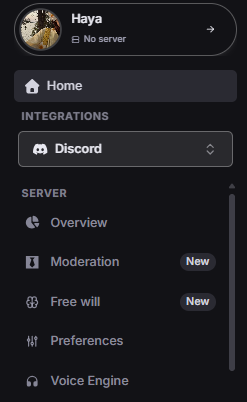
Discord Tab Opens
- Overview - Server Selection and usage statistics.
- Moderation - Set up your character as a server moderator.
- Free Will - Set up how your character behaves on its own in the server.
- Preferences - Set up main configuration preferences for the server.
- Voice Engine - Configure Voice Engine options for your server.